Terminal email client

Email that stays in the terminal.

Termail syncs mail over IMAP, keeps a local SQLite copy you can search offline, and sends over SMTP — all through a keyboard-first interface built with Bun, TypeScript, and OpenTUI.

Bun v1.4.1 · IMAP + SMTP · SQLite + FTS5 · AI off by default

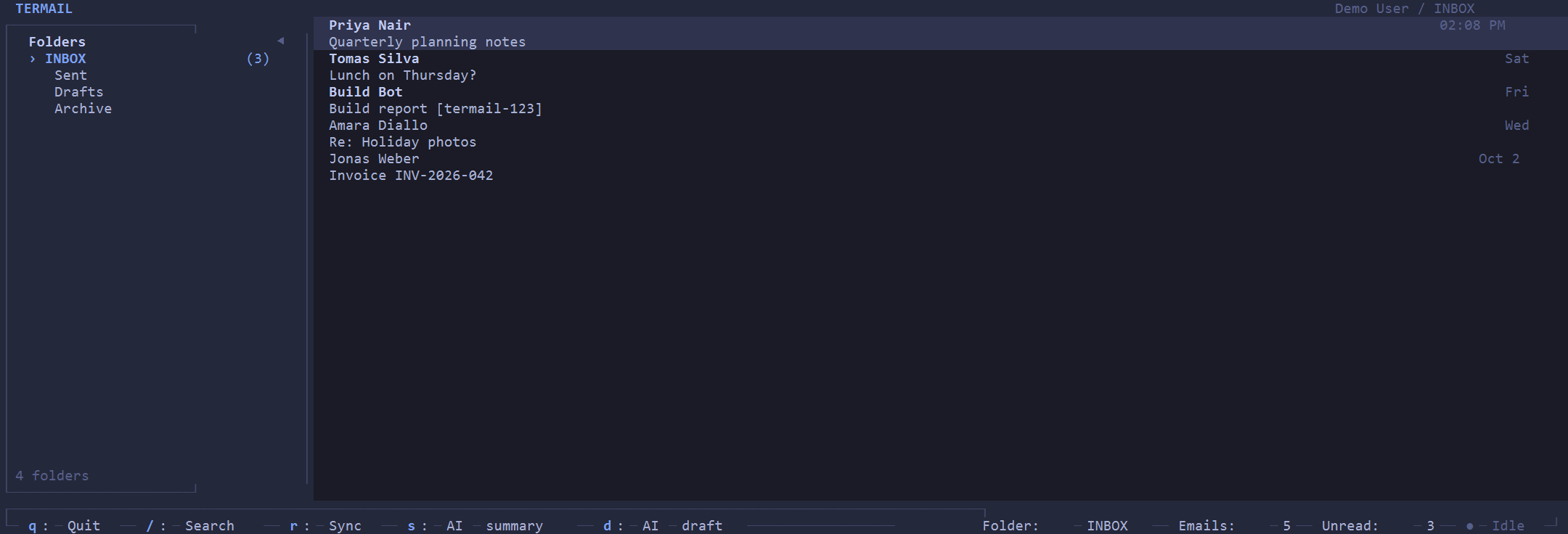
Termail terminal inbox with folders on the left and a message list on the right, using synthetic demo data
Real interface, synthetic demo data — no private mail shown.

The product experience

One screen, three regions: folders on the left, messages in the middle, and a status bar along the bottom. Everything is reachable without leaving the keyboard.

Inbox and folders

Termail discovers your account's folders on first sync, prefers INBOX, and tracks a per-folder checkpoint so later syncs resume where they left off. Move between folders with h / Left or l / Right (or Tab); the status bar always shows the current folder, message counts, and sync state.

Reading and search

Step through mail with j / Down and k / Up, open with Enter, step back with Esc. Press / to search the local full-text index — backed by SQLite FTS5 — with structured operators:

from:, to:, subject:, is:read, is:unread, has:attachment, folder:, after:, before:.

Keyboard map — matches the default set in the README
j / Down, k / UpNext / previous email
h / Left, l / Right, TabPrevious / next folder
EnterOpen the highlighted email
EscBack to the list, keeping the highlight
/Search (Esc cancels, Enter submits)
rSync the current folder
s / dAI summary / AI-drafted reply (opt-in, never auto-sends)
qQuit

Capabilities

What Termail does today — email, synchronization, configuration, and optional AI — as implemented in the repository.

Email over IMAP and SMTP

  • IMAP sync (via imapflow) with local SQLite persistence.
  • SMTP sending over implicit TLS or STARTTLS with password auth; no external SMTP library.
  • SMTP needs smtpHost on the account; port and mode default to implicit TLS on 465.

Local-first storage and config

  • Messages stored locally in SQLite with an FTS5 search index.
  • JSON config at ~/.config/termail/config.json, validated with Zod.
  • UI preferences: theme, pane ratio, status bar, folder icons, compact mode.

Optional AI assistance

  • Summarize the selected email (s) or draft a reply (d) via OpenRouter.
  • Disabled by default; only runs when explicitly invoked.
  • Drafts land in compose for review — nothing is ever auto-sent.

Built for review

  • Strict TypeScript, Zod-validated config, Biome lint and format.
  • Deterministic Bun test gate (bun run test:sequential).
  • Source, docs, and security policy live in the same repository.

Current limitation: sending works through the compose service and AI-drafted replies routed into compose for review. There is no full-screen compose editor yet; external-editor composition is planned.

Getting started

From the repository README. Requires Bun v1.4.1 (pinned in package.json and CI).

  1. Clone and install:
    git clone https://github.com/arjunmaybe/Termail.git
    cd Termail
    bun install
  2. Run, build, and check:
    bun run dev
    bun run build
    bun run test:sequential
    bun run typecheck
    bun run lint
  3. Add accounts to ~/.config/termail/config.json, then save the password once into the OS credential store (input is hidden):
    bun run src/main.ts --set-password work

    Also available: --set-oauth-token, --delete-password, --delete-oauth-token. On platforms without OS credential storage, use per-account environment variables instead (see Security).

Security and privacy

A plain summary of the implementation and security policy — what stays local, what leaves the machine, and what Termail does not promise.

Local mail storage

Mail is stored in a local SQLite database that is not encrypted by Termail. On POSIX systems Termail restricts its data directories to owner-only access; on Windows no ACL hardening is performed, so configure filesystem ACLs externally on shared machines.

Credentials

Passwords and tokens never live in config.json, the mail database, logs, or issue reports. The fastest option is the one-time OS credential-store save (Windows Credential Manager). OS storage is implemented on Windows only; elsewhere — and for headless use — set TERMAIL_<ACCOUNT_ID>_PASSWORD or TERMAIL_<ACCOUNT_ID>_OAUTH_TOKEN. Environment variables take precedence when both are configured.

What the AI provider receives

Only when you press s or d: the selected email's headers (From, To, Cc, Subject, Date) and up to maxBodyChars body characters (default 8000, sent inside an explicit <email> block marked as data). The default endpoint is OpenRouter's chat-completions API. Output is display text or a draft for review.

Reporting

Only the latest main commit receives security fixes. Report issues through GitHub private vulnerability reporting with redacted material — never live credentials or mailbox contents. There is no paid bounty program.

Frequently asked questions

What do I need to run Termail?

Bun v1.4.1, a clone of the repository, and bun install. You also need at least one email account with IMAP details (and smtpHost if you want to send).

Where does my configuration live?

At ~/.config/termail/config.json (version 1), validated with Zod. It holds database path, UI preferences, accounts, and AI settings — never secrets.

How are passwords handled on Linux or macOS?

OS credential storage is Windows-only today. On other platforms, set per-account secrets in the environment: TERMAIL_<ACCOUNT_ID>_PASSWORD or TERMAIL_<ACCOUNT_ID>_OAUTH_TOKEN.

Is my local mail database encrypted?

No. Termail does not encrypt the SQLite database. POSIX systems get owner-only directories and files; Windows needs externally configured filesystem ACLs on shared machines.

Does the AI act on my mailbox?

No. AI only summarizes or drafts when you explicitly press s or d. Drafts go into compose for review and nothing is auto-sent. AI is off by default.

Can I compose and send a new message today?

Sending works through the compose service and AI-drafted replies routed into compose for review. There is no full-screen compose editor yet.